| View previous topic :: View next topic |
| Author |
Message |
ChopChaeJoe
Joined: 05 Mar 2006
Location: Seoul
|
 Posted: Tue Jan 23, 2007 3:52 am Post subject: pinning a folder to start menu XP Posted: Tue Jan 23, 2007 3:52 am Post subject: pinning a folder to start menu XP |
 |
|
how do I do this .. specifically, i'd like to pin the My Computer file to my start menu so i don't have to make a bunch of clicks to get into a drive.
thanks. |
|
| Back to top |
|
 |
SuperHero

Joined: 10 Dec 2003
Location: Superhero Hideout
|
| Posted: Tue Jan 23, 2007 4:07 am Post subject: |
|
|
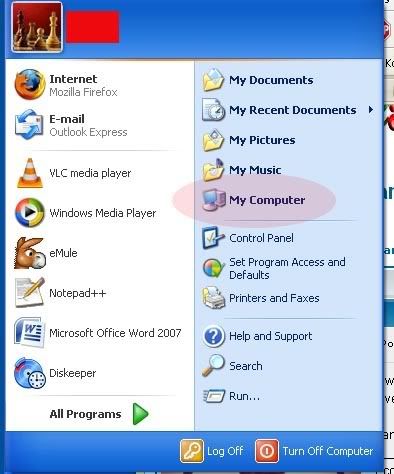
my computer is on the start menu by default
 |
|
| Back to top |
|
|
denverdeath
Joined: 21 May 2005
Location: Boo-sahn
|
| Posted: Tue Jan 23, 2007 4:26 am Post subject: |
|
|
| Depends on whether or not you're using "Start Menu" or "Classic Start Menu." If you happen to be using the latter, right-click on your taskbar and select "properties." From there, choose "customize" and then you can add or remove whatever you want. For "My Computer," select "advanced" and drag "My Computer" over. Hit "Apply" and you should be set. |
|
| Back to top |
|
|
ChopChaeJoe
Joined: 05 Mar 2006
Location: Seoul
|
| Posted: Tue Jan 23, 2007 4:39 am Post subject: |
|
|
I think that's going to work, Denverdeath.
Now how do i do that cool thing with posting a portion of my screen, like the start menu graphic above? |
|
| Back to top |
|
|
kprrok
Joined: 06 Apr 2004
Location: KC
|
| Posted: Tue Jan 23, 2007 4:39 am Post subject: |
|
|
I just have a my computer icon on my desktop. one double-click and I'm in! Why have it more complicated than that?
KPRROK |
|
| Back to top |
|
|
ChopChaeJoe
Joined: 05 Mar 2006
Location: Seoul
|
| Posted: Tue Jan 23, 2007 4:41 am Post subject: |
|
|
| kprrok wrote: |
I just have a my computer icon on my desktop. one double-click and I'm in! Why have it more complicated than that?
KPRROK |
because when I have 20 open windows on my desktop, I don't want to have to minimize each one to get back to my desktop. |
|
| Back to top |
|
|
the_beaver

Joined: 15 Jan 2003
|
| Posted: Tue Jan 23, 2007 4:43 am Post subject: |
|
|
| Mine's on the quick launch. Just drag and drop to get it there. |
|
| Back to top |
|
|
kprrok
Joined: 06 Apr 2004
Location: KC
|
| Posted: Tue Jan 23, 2007 5:30 am Post subject: |
|
|
I'd put it in the quick-launch, but my QL already has a "show desktop" button that auto-minimizes everything.
KPRROK |
|
| Back to top |
|
|
denverdeath
Joined: 21 May 2005
Location: Boo-sahn
|
| Posted: Tue Jan 23, 2007 7:55 am Post subject: |
|
|
| ChopChaeJoe wrote: |
I think that's going to work, Denverdeath.
Now how do i do that cool thing with posting a portion of my screen, like the start menu graphic above? |
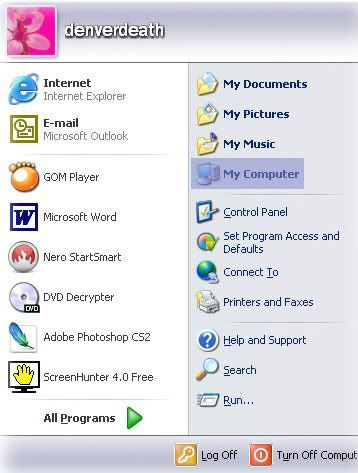
Not all that hard if you know a few short-cut keys. Press "Start" and then "Ctrl + Print Screen" and open an image program and hit "Ctrl + v" to paste the image of the desktop. Use the select or crop tool to select the area you want to save and then add any bells and whistles that you desire and save it as a jpeg to upload to photobucket or wherever. |
|
| Back to top |
|
|
|




 FAQ
FAQ Search
 Memberlist
 Usergroups
 Register
 Profile
 Log in to check your private messages
 Log in


