| View previous topic :: View next topic |
| Author |
Message |
SuperHero

Joined: 10 Dec 2003
Location: Superhero Hideout
|
 Posted: Sun Dec 30, 2007 5:09 am Post subject: Posted: Sun Dec 30, 2007 5:09 am Post subject: |
 |
|
| bassexpander wrote: |
Ok, mine is up and running... a few questions for ya:
I noticed that in your photo (and on my system) the ink lines do not fully fill with ink entirely on the way to the print heads. Is that they way it's supposed to be, or should the lines be totally filled with ink with no air pockets? I was afraid I messed something up because I didn't know it would attempt to suck ink into the printer immediately when I turned it on. I noticed it was doing so, and worried, that there would be a problem, so I immediately pulled the little rubber ends out of the top of the ink cartridges (the small plug). I was hoping that I didn't screw something up by not having them open when I first turned the printer on. It seemed like a vacuum sucked the ink back up and into the cartridges. |
Yeah that's normal. When the ink in the cartridges gets low it'll suck it up through the lines and then leave air there. No problems for me since i got it. |
|
| Back to top |
|
 |
bassexpander
Joined: 13 Sep 2007
Location: Someplace you'd rather be.
|
| Posted: Sun Dec 30, 2007 5:55 am Post subject: |
|
|
Cool beans!
Wish I had this at the office. |
|
| Back to top |
|
|
Demophobe

Joined: 17 May 2004
|
| Posted: Sun Dec 30, 2007 8:44 am Post subject: |
|
|
| bassexpander wrote: |
I suppose demo got the 7280? model... the one that does double-sided printing? I think we can upgrade to that if we buy the extra part to do it, but I figure I don't need it. I got the 6180 model.
|
Indeed he did.
Interestingly, using any 3rd party ink except for "Inktech" (sp?) voids the warranty. So said the salesman, so rolled my eyes. HP guy said the same and my eyes rolled back.
We have Inktech.
My wife's recent upgrade to "Barter 2.0" was well worth it. |
|
| Back to top |
|
|
bassexpander
Joined: 13 Sep 2007
Location: Someplace you'd rather be.
|
| Posted: Sun Dec 30, 2007 3:58 pm Post subject: |
|
|
| Demophobe wrote: |
My wife's recent upgrade to "Barter 2.0" was well worth it. |
Just wait until the "Ajumma Barter 2.1" update is installed. Then you'll let her do all of the talking. 
My lady's mom is running the "Halmony Barter 3.2 Professional" upgrade. Salespeople are scared to death of her! |
|
| Back to top |
|
|
SuperHero
Joined: 10 Dec 2003
Location: Superhero Hideout
|
| Posted: Sun Dec 30, 2007 4:24 pm Post subject: |
|
|
| bassexpander wrote: |
| Demophobe wrote: |
My wife's recent upgrade to "Barter 2.0" was well worth it. |
Just wait until the "Ajumma Barter 2.1" update is installed. Then you'll let her do all of the talking.
My lady's mom is running the "Halmony Barter 3.2 Professional" upgrade. Salespeople are scared to death of her! |
Not nearly as scary or annoying as the ajjuma subway seat 3.7 ultimate professional edition |
|
| Back to top |
|
|
bassexpander
Joined: 13 Sep 2007
Location: Someplace you'd rather be.
|
| Posted: Sun Dec 30, 2007 5:34 pm Post subject: |
|
|
| SuperHero wrote: |
| bassexpander wrote: |
| Demophobe wrote: |
My wife's recent upgrade to "Barter 2.0" was well worth it. |
Just wait until the "Ajumma Barter 2.1" update is installed. Then you'll let her do all of the talking.
My lady's mom is running the "Halmony Barter 3.2 Professional" upgrade. Salespeople are scared to death of her! |
Not nearly as scary or annoying as the ajjuma subway seat 3.7 ultimate professional edition |
Yeah... and the 64-butt version is much more difficult to deal with than the 32-butt version! |
|
| Back to top |
|
|
bassexpander
Joined: 13 Sep 2007
Location: Someplace you'd rather be.
|
| Posted: Mon Dec 31, 2007 9:28 am Post subject: |
|
|
My color photo prints aren't looking very good. They seem overly yellow. I've been adjusting levels trying to eyeball it for a better print. The colors aren't all that vibrant. Am choosing the correct photo paper, etc. Bad ink?
Not sure what ink brand is in there. |
|
| Back to top |
|
|
SuperHero
Joined: 10 Dec 2003
Location: Superhero Hideout
|
| Posted: Mon Dec 31, 2007 2:18 pm Post subject: |
|
|
| bassexpander wrote: |
My color photo prints aren't looking very good. They seem overly yellow. I've been adjusting levels trying to eyeball it for a better print. The colors aren't all that vibrant. Am choosing the correct photo paper, etc. Bad ink?
Not sure what ink brand is in there. |
Mine looked great strait from the get go. did you have to install it yourself? when I bought the printer the external ink was already installed and ready to go...
if the color is crappy, I would take it back to the shop and show them - bring the exact file as well and see if he can get it to print correctly... |
|
| Back to top |
|
|
bassexpander
Joined: 13 Sep 2007
Location: Someplace you'd rather be.
|
| Posted: Mon Dec 31, 2007 5:58 pm Post subject: |
|
|
Yeah, it was all installed.
I just went in and fiddled with it for a few hours last night and today until I got the settings that look right. Now all is well. I had to go into the advanced settings in Photosmart Premiere and manually adjust color settings. It looks right now after backing the yellow off -16. Pretty severe adjustment, but it looks about perfect. I also added +1 saturation and +1 black.
No way to save the changed settings as default, though. Have to write them down.
It took a big gulp of ink on all tubes this morning.  |
|
| Back to top |
|
|
SuperHero
Joined: 10 Dec 2003
Location: Superhero Hideout
|
| Posted: Tue Apr 01, 2008 4:33 am Post subject: out of ink, NOT! |
|
|
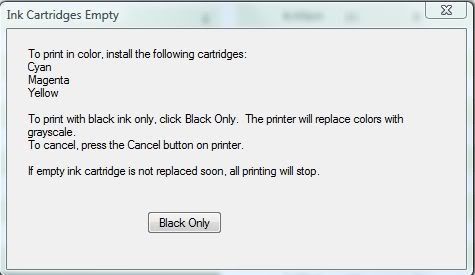
Today I printed three documents but I got this error that I am out of color ink - clearly I am not as the inkwells are 70% full.
Anyhow the error message said that it would print grayscale, but printouts came in color - any ideas
 |
|
| Back to top |
|
|
bassexpander
Joined: 13 Sep 2007
Location: Someplace you'd rather be.
|
| Posted: Tue Apr 01, 2008 4:37 am Post subject: |
|
|
I don't know what to tell you. You'll have to ask the store guys about that. I'm sure there is a workaround. It's surely software-related. What happens if you take them out and put them back in?
By the way, my external ink kit was too heavy for the tape, and it all fell off last week. I have this nice rainbow-colored waterfall pattern down the side of the tablecloth it was on. It slowly dripped out of the top holes. Looks kind of cool, actually. |
|
| Back to top |
|
|
SuperHero
Joined: 10 Dec 2003
Location: Superhero Hideout
|
| Posted: Sat May 17, 2008 11:38 pm Post subject: |
|
|
regarding the error above, i rebooted and everything was fine.
yesterday I bought a black ink refill for the first time (6 months since I bought it). My color inks are still more than half full except for yellow which is about 45%.
In this time, I've printed easily 70-120 pages a week in color, 3 ebooks (300-400 pages in color) about 70 photos, made dozens of color copies. The ink is so cheap, I feel like I could easily run my own home publishing outfit. |
|
| Back to top |
|
|
SHANE02

Joined: 04 Jun 2003
|
| Posted: Sun May 18, 2008 6:00 am Post subject: |
|
|
| yes , the best thing I ever did as far as printers go was get this external ink thing. I never have to worry about running out of ink. |
|
| Back to top |
|
|
SuperHero
Joined: 10 Dec 2003
Location: Superhero Hideout
|
| Posted: Fri Nov 14, 2008 2:40 pm Post subject: |
|
|
| It's been a year since I bought this printer and my total ink cost = 5,000won and I don't need to buy any for the foreseeable future. |
|
| Back to top |
|
|
bassexpander
Joined: 13 Sep 2007
Location: Someplace you'd rather be.
|
| Posted: Sat Nov 15, 2008 6:54 pm Post subject: |
|
|
I'm enjoying mine, too. The only thing that sucks about it is the software is sort of buggy sometimes, but updates seem to be solving the issues as of late. I noticed a date somewhere that says my ink will expire at the end of the year (or something like that). I hope this isn't some new thing HP added to the updates to combat people doing what we're doing. I believe I saw it in a menu somewhere. We'll see what happens!
I'm glad I bought this printer last year. I see the prices have been raised on them (and everything else) at many stores.
There are now some new refillable ink cartridges that hold the ink like water, and are really easy to refill by hand. Those are the new rage, so you don't have external tanks. |
|
| Back to top |
|
|
|




 FAQ
FAQ Search
 Memberlist
 Usergroups
 Register
 Profile
 Log in to check your private messages
 Log in


